
Home > Industry Information > DIMM:Everything You Should To Know
Ⅰ.Overview of passage
This passage provides a comprehensive overview of Dual In-Line Memory Modules (DIMM), a fundamental component in modern computing. It begins by defining DIMM and emphasizing its significance in computer systems, then categorizes the main types of DIMMs based on technical specifications and generations. Furthermore, it details the diverse application fields of DIMMs with specific examples to illustrate their practical roles. Finally, a summary condenses the key points, highlighting DIMM’s irreplaceable position in the evolution of computing technology.
Ⅱ.Introduction
2.1 What is DIMM
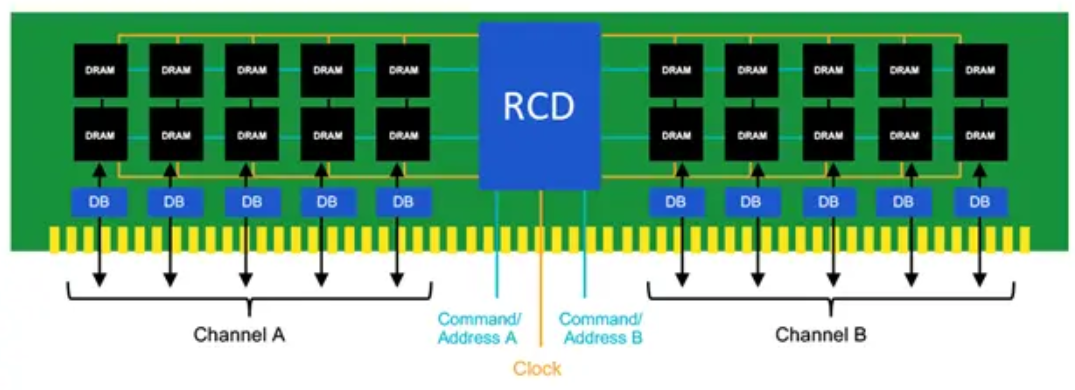
DIMM, short for Dual In-Line Memory Module, is a standardized printed circuit board (PCB) that houses dynamic random-access memory (DRAM) chips, designed to plug into dedicated memory slots on a computer’s motherboard. Unlike its predecessor, the Single In-Line Memory Module (SIMM), DIMMs feature independent electrical contacts on both sides of the PCB, eliminating the need for redundant wiring and enabling higher data transfer rates. Each DIMM typically includes a notch (key) that aligns with the motherboard slot to prevent incorrect installation, and its capacity, speed, and voltage are tailored to work with specific motherboard chipsets.
2.2 The importance of DIMM
DIMM is a critical component that directly impacts a computer’s performance, serving as the system’s short-term data storage for active applications, operating systems, and temporary files. Unlike hard disk drives (HDDs) or solid-state drives (SSDs) (long-term storage), DIMM allows the central processing unit (CPU) to access data at extremely high speeds, reducing latency and enabling smooth multitasking. Without sufficient or high-performance DIMM, even powerful CPUs and GPUs would be bottlenecked, as they would wait longer for data retrieval from slower storage devices. Additionally, DIMM’s modular design allows users to easily upgrade or expand memory capacity, extending the lifespan and functionality of computing devices to meet evolving performance demands.
Ⅲ.Type of DIMM
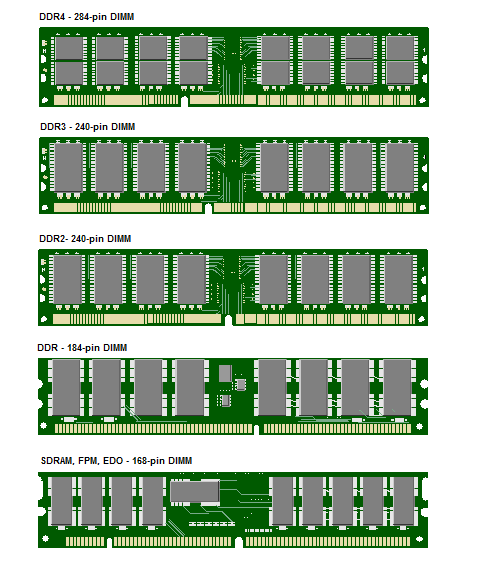
DDR SDRAM DIMM:The first generation of Double Data Rate (DDR) DIMMs, launched in the early 2000s. It operates at data rates ranging from 266 MT/s to 400 MT/s (referred to as DDR-266 to DDR-400) and uses 184 pins for desktop systems. It requires a 2.5V power supply and was widely used in early 2000s desktop and server systems, replacing SDRAM DIMMs.
DDR2 SDRAM DIMM:An upgraded version of DDR, introduced around 2004. It doubles the data transfer rate of DDR (up to 800 MT/s, e.g., DDR2-800) by improving signal processing and uses 240 pins (same as later DDR3 but with a different notch position). It operates at 1.8V, reducing power consumption compared to DDR, and features enhanced error correction capabilities, making it popular in mid-2000s desktops and entry-level servers.
DDR3 SDRAM DIMM:Released in 2007, DDR3 further boosted data rates to up to 2133 MT/s (e.g., DDR3-2133) and reduced voltage to 1.5V (1.35V for low-voltage DDR3L variants). It maintains 240 pins but with a distinct notch to prevent cross-compatibility with DDR2. It introduced advanced features like self-refresh and deeper memory banks, becoming the standard for desktops, laptops (as SO-DIMMs), and servers from the late 2000s to the mid-2010s.
DDR4 SDRAM DIMM:Launched in 2014, DDR4 is the most widely used DIMM type today, with data rates ranging from 2133 MT/s to 5333 MT/s (and beyond for overclocked models). It uses 288 pins (desktop) and 260 pins (laptop SO-DIMMs) with a new notch design, operates at 1.2V (lower power than DDR3), and supports higher capacities (up to 128GB per module for consumer models, 256GB for servers). It also features improved thermal management and higher bandwidth, making it ideal for modern gaming PCs, workstations, and data center servers.
DDR5 SDRAM DIMM:The latest generation, introduced in 2021, offers data rates starting at 4800 MT/s and scaling up to 8400 MT/s. It uses 288 pins (desktop) and 262 pins (laptop SO-DIMMs), operates at 1.1V (even lower power), and supports capacities up to 256GB per module (consumer) and 512GB per module (server). DDR5 integrates on-die ECC (Error-Correcting Code) for better reliability, splits the memory controller between the DIMM and CPU, and provides higher bandwidth, catering to high-performance computing, AI workloads, and next-gen gaming systems.
SO-DIMM:Small Outline DIMM, a compact variant of DIMM designed for space-constrained devices like laptops, tablets, mini-PCs, and routers. It follows the same DDR generations (DDR2 SO-DIMM, DDR3 SO-DIMM, etc.) but with fewer pins (e.g., 204 pins for DDR3 SO-DIMM, 260 pins for DDR4 SO-DIMM) and a smaller physical size, while maintaining similar performance characteristics to standard DIMMs.
UDIMM vs. RDIMM:Unbuffered DIMM (UDIMM) is used in consumer desktops and entry-level servers, with no buffer between the memory and CPU, offering low latency but limited capacity. Registered DIMM (RDIMM) includes a register to amplify signals, supporting higher capacities and more modules per motherboard, making it suitable for enterprise servers and data centers.

Ⅳ.Application field
Consumer Desktop Computers:DIMMs are a core component in home and office desktops, enabling everyday tasks like web browsing, document editing, and media playback. For example, a family desktop might use 8GB or 16GB of DDR4 UDIMMs to run Windows 11 and applications like Microsoft Office smoothly. Gaming desktops often require 16GB to 32GB of high-speed DDR4 or DDR5 DIMMs (e.g., DDR5-5600) to handle graphics-intensive games like Cyberpunk 2077 or Fortnite, ensuring fast loading times and smooth frame rates.
Laptops and Ultrabooks:Compact SO-DIMMs are used in laptops to save space while providing sufficient memory. A business ultrabook might use 16GB of DDR4 SO-DIMMs to support multitasking with multiple browser tabs, video conferencing software (Zoom), and spreadsheet tools simultaneously. Gaming laptops often feature 32GB of DDR5 SO-DIMMs to match the performance of their dedicated GPUs, such as the NVIDIA RTX 4080 Mobile.
Enterprise Servers and Data Centers:Servers rely on high-capacity, reliable DIMMs to handle heavy workloads like cloud computing, database management, and virtualization. For instance, a cloud service provider’s server might use 128GB or 256GB of DDR4 RDIMMs to host hundreds of virtual machines (VMs) for clients. Data centers processing big data analytics often adopt DDR5 RDIMMs with ECC to ensure data integrity when running applications like Apache Spark or Hadoop.
Workstations:Professional workstations used in fields like video editing, 3D modeling, and CAD (Computer-Aided Design) require high-performance DIMMs to handle large files and complex computations. A video editor’s workstation might use 64GB of DDR5 UDIMMs to edit 8K footage in Adobe Premiere Pro without lag, while a 3D artist’s workstation could feature 128GB of DDR5 DIMMs to render complex scenes in Blender or Autodesk Maya.
Networking Equipment:Routers, switches, and network appliances use DIMMs to process and buffer network traffic. A high-end enterprise router might use 32GB of DDR4 SO-DIMMs to manage thousands of simultaneous network connections and run routing protocols like BGP (Border Gateway Protocol) efficiently. Network attached storage (NAS) devices also use DIMMs (e.g., 16GB DDR4) to cache frequently accessed files, improving data transfer speeds for connected users.
Industrial Computers:Industrial PCs (IPCs) used in manufacturing, automation, and transportation rely on rugged DIMMs that can withstand extreme temperatures and vibration. For example, an IPC in a factory assembly line might use DDR4 UDIMMs rated for -40°C to 85°C to run PLC (Programmable Logic Controller) software and monitor production equipment. A vehicle-mounted computer in a truck could use DDR3 SO-DIMMs to process GPS data and vehicle diagnostics in harsh road conditions.
Gaming Consoles:Modern gaming consoles like the PlayStation 5 and Xbox Series X/S use custom DIMM-based memory systems. The PS5 features 16GB of GDDR6 memory (a type of high-speed DIMM variant) to support its 4K resolution and ray tracing capabilities, ensuring seamless gameplay for titles like God of War: Ragnarök.
Ⅴ.Summary
In summary, DIMM is an indispensable component in modern computing, serving as the high-speed temporary memory that bridges the CPU and long-term storage. From its definition as a dual-contact memory module to its critical role in enhancing system performance and enabling multitasking, DIMM has evolved through generations (DDR to DDR5) to meet growing demands for speed, capacity, and efficiency. Its diverse types—including standard DDR variants, SO-DIMMs, UDIMMs, and RDIMMs—cater to a wide range of applications, from consumer desktops and laptops to enterprise servers, workstations, and industrial equipment. As computing technology advances, DIMMs will continue to evolve, with DDR5 and future generations driving innovation in high-performance computing, AI, and next-gen consumer electronics, solidifying their position as a cornerstone of modern digital systems.
Industry Information