
Home > Industry Information > The Hard Disk Drive (HDD) Explained: A Cornerstone Of Data Storage
This article provides a comprehensive overview of the Hard Disk Drive (HDD). It explains its definition, core mechanical principles, and key performance metrics. The text analyzes the strengths and weaknesses of HDDs compared to SSDs, traces the technology's development, and explores future trends. Finally, it outlines practical applications and selection guidelines.
A Hard Disk Drive (HDD) is a traditional data storage device used to store operating systems, applications, and user data over the long term. It is one of the most common internal storage components in computers and is widely used in personal computers, servers, storage systems, and many embedded applications.
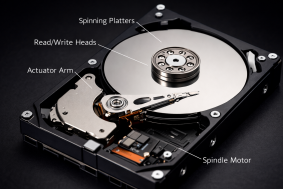
At the heart of an HDD are one or more rapidly spinning, rigid platters coated with a magnetic material. Data is written and read by a read/write head that floats nanometers above the platter's surface.
Writing Data: The head generates a magnetic field, altering the polarity of tiny magnetic domains on the platter to represent binary 0s and 1s.
Reading Data: The head detects the magnetic polarity of these domains and converts the changes into electrical signals.
All platters are fixed on a central spindle rotated by a motor (common speeds are 5400 or 7200 Revolutions Per Minute - RPM). The head is mounted on an actuator arm that moves rapidly across the radius of the platters to access data. This mechanical process of seeking and rotational latency is key to determining an HDD's speed.
When evaluating an HDD, the main metrics are:
Capacity: Measured in Gigabytes (GB) or Terabytes (TB). Consumer-grade HDDs now exceed 20TB per drive.
Rotational Speed: Typically 5400 RPM (quieter, more energy-efficient) or 7200 RPM (better performance). Enterprise drives may reach 10,000 or 15,000 RPM.
Cache: A small amount of built-in high-speed memory (commonly 64MB to 256MB) that acts as a buffer to improve read/write efficiency.
Interface: The standard connecting the drive to the motherboard. SATA is mainstream for consumers, while SAS is prevalent in enterprise environments.
Mean Time Between Failures (MTBF): A reliability metric, usually given in hours; a higher number indicates greater reliability.
Key Advantages of HDDs:
·Very Low Cost: The cost per GB is significantly lower than SSDs, making HDDs the economical choice for mass storage.
·Proven Technology, High Capacity: Single-drive capacities continue to grow, and data recovery is often possible if damaged.
·Long Lifespan: Under stable conditions, their theoretical read/write endurance is very long.
Key Disadvantages of HDDs:
·Slower Speed: Due to reliance on mechanical parts, read/write speeds (especially random access) are much slower than all-electronic SSDs.
·Power Consumption, Noise, and Heat: The spinning motor and moving arm generate noticeable heat, noise, and vibration.
·Fragility: Physical shock or movement while operating can cause the head to contact and scratch the platter, leading to data loss.
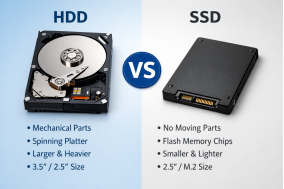
Comparison with Solid State Drives (SSDs): SSDs use flash memory with no moving parts, giving them superior speed, shock resistance, silence, and power efficiency. However, they are more expensive per GB and have a finite number of write cycles. A common modern configuration uses an SSD as the primary drive for the operating system and applications, paired with an HDD as a data drive for bulk storage of documents, media files, and backups.
Since IBM introduced the first commercial hard drive in 1956 (the RAMAC, with a 5MB capacity and a refrigerator-sized footprint), HDD technology has advanced rapidly on the path of getting "smaller, faster, and denser." Future trends focus on:
Increasing Areal Density: Using new technologies like Heat-Assisted Magnetic Recording (HAMR) and Microwave-Assisted Magnetic Recording (MAMR) to store more data in the same physical space.
Hybrid Drives (SSHDs): Combining a small amount of fast flash memory with a traditional HDD to balance speed and cost.
Consolidating its Niche: Its high-capacity, low-cost advantage remains difficult to replace in the near term for enterprise cold storage, surveillance systems, and personal Network-Attached Storage (NAS) devices.
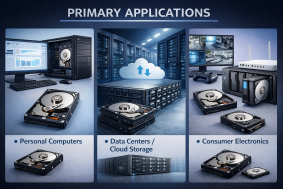
Primary Applications:
·Personal Computers: As high-capacity storage for data.
·Data Centers / Cloud Storage: The foundational building block of storage servers and RAID arrays.
·Consumer Electronics: Used in surveillance DVRs, game consoles, and NAS devices.
Selection Guidelines:
·Define Your Need: For maximum speed and responsiveness, choose an SSD. For storing large photo, video, or game libraries, an HDD is the cost-effective choice.
·Consider Specifications: For general home or NAS use focusing on reliability, choose a 5400/7200 RPM NAS-specific drive. For better desktop performance, a 7200 RPM drive is suitable.
·Brand and Warranty: Opt for reputable brands like Seagate, Western Digital, or Toshiba, and pay attention to the warranty period.
In summary, the Hard Disk Drive remains an indispensable and economically vital component in the landscape of data storage. Despite the superior speed and ruggedness of Solid-State Drives, the HDD's unparalleled cost-per-gigabyte advantage and proven reliability for high-capacity needs secure its ongoing relevance. Its evolution, from room-sized units to multi-terabyte compact devices, demonstrates remarkable engineering progress, with future innovations like HAMR poised to extend its capabilities further. While SSDs dominate performance-critical tasks, HDDs continue to be the workhorse for bulk storage in data centers, personal computers, and dedicated storage systems. Understanding its working principles, performance metrics, and ideal applications allows users to make informed decisions, leveraging the HDD's strengths to build efficient, capacious, and cost-effective storage solutions for the long term.
Industry Information