
Home > Industry Information > Graphics Card Explained:Introduction,Classification,Application
This passage provides a comprehensive explanation of graphics cards, covering their fundamental definition, structural composition, and working principles. It further classifies graphics cards based on key criteria such as purpose, interface, and form factor, and elaborates on their specific applications corresponding to each category. Finally, it summarizes the core value and evolving role of graphics cards in modern computing and related fields.
2.1What is a graphics card
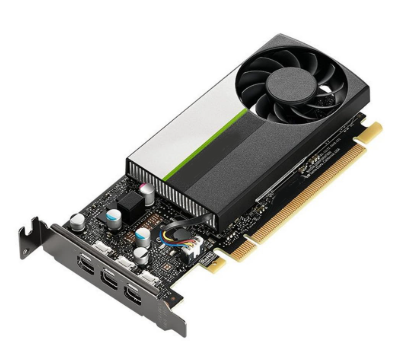
A graphics card, also known as a video card or graphics processing unit (GPU) card, is a specialized hardware component designed to handle and accelerate the rendering of images, videos, and 3D graphics for display on a monitor. It offloads graphics-related computational tasks from the central processing unit (CPU), significantly improving the performance and smoothness of visual output in computing systems. From basic desktop computing to high-end gaming and professional design, graphics cards play a pivotal role in delivering high-quality visual experiences and supporting graphics-intensive workloads.
2.2Structure
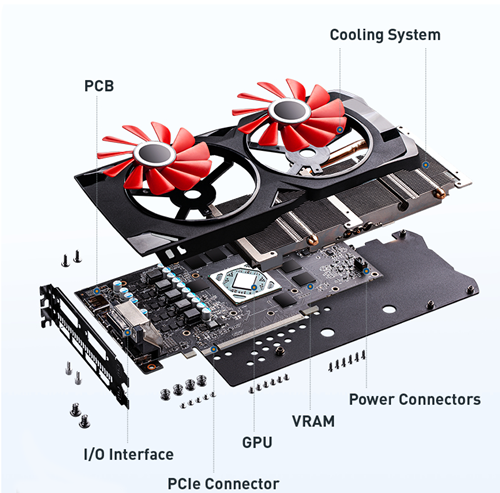
GPU Chip:The core component, responsible for executing complex graphics calculations, including vertex processing, pixel rendering, and shader operations. It is designed with a large number of parallel processing cores to handle massive data streams efficiently.
Video Memory (VRAM):A high-speed dedicated memory (e.g.,GDDR5, GDDR6) that stores temporary graphics data, such as textures, frame buffers, and 3D models. Its bandwidth and capacity directly affect the card’s ability to process high-resolution and complex graphics.
Power Delivery System:Includes voltage regulators, capacitors, and connectors (e.g.,6-pin, 8-pin) that supply stable power to the GPU and VRAM, ensuring reliable operation under heavy loads.
Cooling System:Comprises heatsinks, fans, or liquid cooling solutions to dissipate the heat generated by the GPU during operation, preventing overheating and maintaining performance.
Interface:The connection port (e.g., PCIe, AGP) that links the graphics card to the motherboard, enabling data transmission between the CPU and the GPU.
Output Ports:Interfaces such as HDMI, DisplayPort, and DVI that connect the graphics card to monitors, projectors, or other display devices, delivering the rendered visual output.
2.3Working principle
Data Reception:The CPU sends graphics-related data (e.g.,coordinates of 3D objects, texture information) to the graphics card via the motherboard interface.
GPU Processing:The GPU processes the received data in parallel: first, the vertex shader processes the geometric data (e.g.,position, shape) of objects to build a 3D model; then, the pixel shader calculates the color, lighting, and texture of each pixel in the model.
Frame Buffer Storage:The processed pixel data is stored in the VRAM as a frame buffer, which holds the complete image of a single frame.
Display Output:The graphics card reads the frame buffer data and converts it into analog or digital signals (via HDMI/DisplayPort etc.), which are transmitted to the monitor to display the image. This process repeats rapidly (typically 60–144 times per second) to create the illusion of smooth motion.
3.1By purpose
Consumer Graphics Cards:Designed for everyday computing, gaming, and multimedia consumption. They balance performance and cost, supporting high-definition video playback, mainstream gaming at various resolutions (1080p, 1440p, 4K), and basic content creation. Examples include NVIDIA’s GeForce RTX 30 Series and AMD’s Radeon RX 6000 Series.
Professional Graphics Cards:Optimized for professional applications such as 3D modeling, animation, video editing, architectural design, and scientific visualization. They offer certified drivers for professional software (e.g.,AutoCAD, Maya, Adobe Premiere Pro) and higher precision rendering. Examples include NVIDIA’s Quadro Series and AMD’s Radeon Pro Series.
Integrated Graphics Cards:Embedded within the CPU (e.g.,Intel UHD Graphics, AMD Radeon Vega Graphics) without dedicated VRAM (sharing system RAM instead). They are low-cost, low-power, and suitable for basic tasks like web browsing, document editing, and standard-definition video playback, but lack performance for heavy gaming or professional work.
3.2By Interface
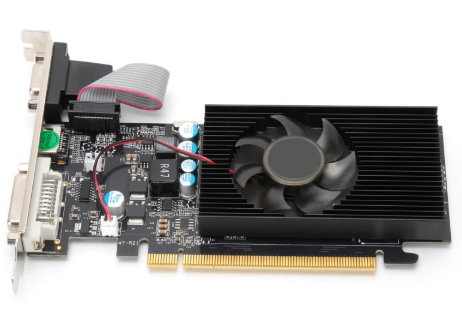
PCI Express (PCIe) Graphics Cards:The dominant type currently, using PCIe slots (e.g.,PCIe 3.0, PCIe 4.0) on the motherboard for high-speed data transfer. They support plug-and-play functionality and are compatible with most modern desktops.
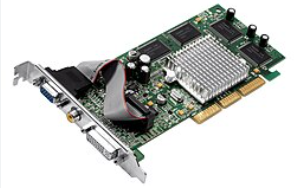
AGP (Accelerated Graphics Port) Graphics Cards:An older interface replaced by PCIe. They were common in desktops from the late 1990s to the mid-2000s but are now obsolete.
External Graphics Cards (eGPU):Connect to laptops or small form-factor desktops via Thunderbolt 3/4 or USB-C interfaces. They allow users to upgrade graphics performance externally without replacing the entire system.
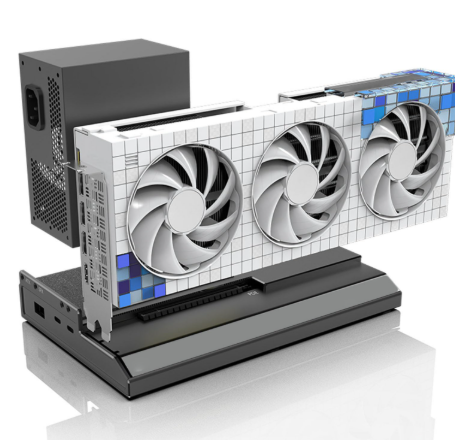
3.3By Form Factor
Full-Size Graphics Cards:Standard-sized cards designed for ATX or mid-tower cases, offering maximum performance with large GPUs, high-capacity VRAM, and robust cooling systems.
Low-Profile Graphics Cards:Compact cards with a smaller height, suitable for small form-factor (SFF) cases or slim desktops. They often have reduced performance compared to full-size models but prioritize space efficiency.
Mobile Graphics Cards:Customized for laptops, integrated into the laptop’s motherboard or as a dedicated module.They are optimized for power efficiency to extend battery life while providing sufficient performance for mobile gaming or content creation (e.g.,NVIDIA GeForce RTX 40 Series Laptop GPUs).
4.1Consumer Graphics Cards Applications
Gaming:Powering PC gaming experiences, supporting high-resolution (4K/8K), high-refresh-rate (144Hz/240Hz) gameplay, and advanced features like ray tracing and DLSS (Deep Learning Super Sampling) for realistic visuals.
Multimedia Consumption:Enabling smooth playback of 4K/8K videos, video editing for personal use (e.g.,with Adobe Premiere Elements), and live streaming with real-time video encoding.
Casual Content Creation:Supporting basic 3D modeling(e.g.,with Blender for hobbyists) and photo editing (e.g.,Adobe Photoshop) with accelerated rendering.
4.2Professional Graphics Cards Applications
3D Design and Animation:Used in architectural visualization, product design (e.g.,AutoCAD, SolidWorks), and film animation (e.g.,Maya, 3ds Max) to render complex 3D models and high-quality animations efficiently.
Video Production:Supporting professional video editing, color grading (e.g.,DaVinci Resolve),and post-production for film and television,with accelerated encoding/decoding of high-bitrate footage.
Scientific and Medical Visualization:Assisting in data visualization for fields like meteorology, astronomy, and medical imaging (e.g.,MRI/CT scan analysis) by processing and rendering large datasets into understandable visual formats.
4.3Integrated Graphics Cards Applications
Everyday Computing:Supporting basic tasks such as web browsing, word processing (e.g., Microsoft Office), and video conferencing (e.g.,Zoom, Teams) on budget desktops and laptops.
Educational Devices:Used in school laptops and Chromebooks for educational software and online learning platforms, where high graphics performance is not required.
4.4External Graphics Cards (eGPU) Applications
Laptop Upgrades:Enhancing the graphics performance of thin-and-light laptops for gaming or content creation, allowing users to switch between portability and performance.
Workstation Expansion:Providing additional graphics power for professional workstations that need to handle multiple displays or graphics-intensive tasks temporarily.
4.5Mobile Graphics Cards Applications
Mobile Gaming:Delivering console-like gaming experiences on gaming laptops (e.g.,ASUS ROG, Lenovo Legion) with support for high-resolution and high-frame-rate gameplay.
On-the-Go Content Creation:Enabling video editing, 3D modeling, and photo retouching on mobile workstations (e.g.,Dell XPS 17, MacBook Pro) for professionals who need to work remotely.
Graphics cards are essential components that enable high-quality visual experiences and support graphics-intensive tasks across various fields. From integrated cards for basic computing to professional cards for advanced design, their classification based on purpose, interface, and form factor allows them to cater to diverse user needs. Whether powering immersive gaming, accelerating professional content creation, or facilitating everyday computing, graphics cards continue to evolve, driving innovations in visual technology and expanding their applications in emerging areas like virtual reality (VR), artificial intelligence (AI), and cloud gaming. Their ability to offload computational tasks from the CPU makes them indispensable in modern computing systems.
Industry Information